
How to Read a Digital Green Meter
A code-by-code guide to your net-metering meter — what each display code means and which two numbers actually determine your bill.
In this guide12 sections
If you’ve installed solar panels and switched to net metering (or net billing), you’ve probably noticed something new next to your old meter: a green meter. Unlike a standard meter, it doesn’t show one number — it cycles through dozens of codes, and most homeowners have no idea what any of them mean. That matters because this meter is what actually determines your solar savings. This guide breaks down what each code means, from basic import/export totals to the more technical reactive power, maximum demand and AMR-specific readings, so you can check your own numbers without guessing.
What Is a Green Meter?
A green meter is the bidirectional meter installed for net metering / net billing connections. It tracks electricity flowing both ways: Import — power you draw from the grid when your solar isn’t producing enough; Export — surplus solar power you send back to the grid, credited against your bill. Because it tracks two-way flow plus peak/off-peak splits and reactive power, it cycles through far more codes than a regular meter.
This guide applies whether you’re on the older net metering system or the newer net billing framework introduced in February 2026 — see our net metering vs net billing guide for that distinction. The meter codes themselves are identical either way; only how your DISCO calculates the bill from Codes 04 and 05 differs.
Green Meter Reading Codes
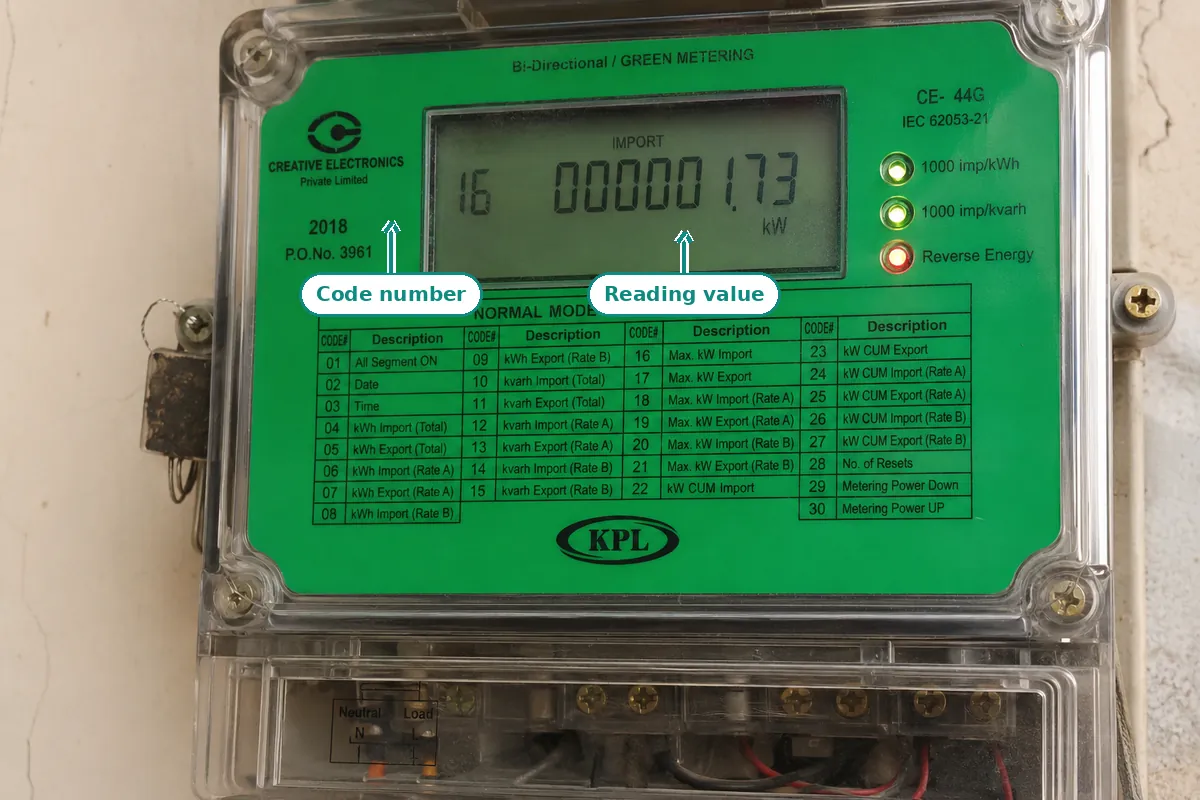
Basic Display Codes
- Code 01 — Display Test: all digits light up briefly to confirm the screen works; not a reading.
- Code 02 — Current Date (day/month/year).
- Code 03 — Current Time (hours:minutes:seconds).
Grid Import Readings (Power You Bought)
- Code 04 — Total Import Units: total electricity drawn from the grid since installation — the single most important number for your bill alongside Code 05.
- Code 06 — Import (Peak): grid electricity used during peak hours, usually billed higher.
- Code 08 — Import (Off-Peak): grid electricity used during off-peak hours.
Solar Export Readings (Power You Sold)
- Code 05 — Total Export Units: total solar power sent back to the grid — the credit side of your bill.
- Code 07 — Export (Peak): solar exported during peak hours, usually at a better rate.
- Code 09 — Export (Off-Peak): solar exported during off-peak hours.
Quick check: Total Import (04) always equals Peak Import (06) + Off-Peak Import (08), and Total Export (05) always equals Peak Export (07) + Off-Peak Export (09). If the numbers don’t add up, re-check your reading before assuming a meter fault.
How to Tell Import vs Export at a Glance
- Even-numbered codes (04, 06, 08, 10, 12…) = Import — power you drew from the grid
- Odd-numbered codes (05, 07, 09, 11, 13…) = Export — power your solar sent to the grid
- Arrow pointing right (→) = Import. Arrow pointing left (←) = Export
- T1 = Peak hours, T2 = Off-peak hours, TL = Total (peak + off-peak combined)
| Category | Import (Even) | Export (Odd) |
|---|---|---|
| kWh | 04, 06, 08 | 05, 07, 09 |
| kVarh | 10, 12, 14 | 11, 13, 15 |
| MDI | 16, 18, 20 | 17, 19, 21 |
| Cumulative MDI | 22, 24, 26 | 23, 25, 27 |
Rule of thumb: Even + right arrow = money you owe (Import). Odd + left arrow = credit you earned (Export).
When Are Peak (T1) and Off-Peak (T2) Hours?
Peak/off-peak timing shifts every quarter to follow seasonal sunset and cooling-load patterns:
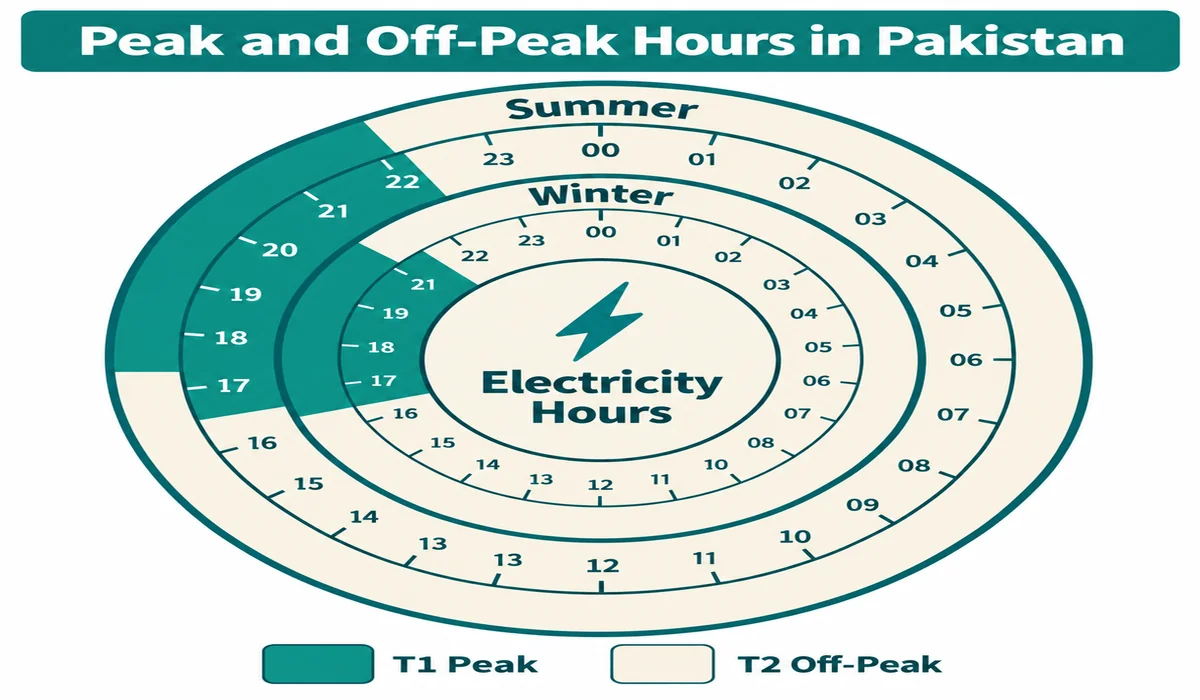
| Quarter | Season | Peak Timing (T1) | Off-Peak Timing (T2) |
|---|---|---|---|
| Q1 | Dec–Feb (Winter) | 5:00 PM – 9:00 PM | Remaining 20 hours |
| Q2 | Mar–May (Spring) | 6:00 PM – 10:00 PM | Remaining 20 hours |
| Q3 | Jun–Aug (Summer) | 7:00 PM – 11:00 PM | Remaining 20 hours |
| Q4 | Sep–Nov (Autumn) | 6:00 PM – 10:00 PM | Remaining 20 hours |
This schedule applies across the PITC billing network — LESCO, IESCO, MEPCO, FESCO, HESCO, PESCO, GEPCO, SEPCO, QESCO, TESCO and HAZECO. K-Electric (Karachi) runs its own separate schedule, independent of this table.
Since the peak window shifts later in summer, a habit that saves you money in spring (running the washing machine at 10 PM, say) might land inside peak hours by summer. Always check the current quarter’s timing rather than assuming last season’s off-peak hours still apply — this is exactly what Codes 06/07 are tracking.
Note: code numbering, arrow direction and TL/T1/T2 labelling can vary slightly by meter make and model. These patterns are common across most digital green meters, but cross-check against your specific meter’s display or manual if something doesn’t match.
Reactive Power Readings
These track how efficiently your load uses power — mainly relevant for larger or commercial connections: Code 10 (Total Reactive Import), Code 11 (Total Reactive Export), Code 12/14 (Reactive Import Peak/Off-Peak), Code 13/15 (Reactive Export Peak/Off-Peak). Most residential users can skip these entirely.
Maximum Demand (MDI) Readings
Code 16 (Monthly Maximum Import Load) is the highest load in kW you pulled from the grid at any single moment that month — useful for spotting whether you’re close to exceeding your sanctioned load. Code 17 is your Maximum Export Power. Codes 18–21 break these down by peak/off-peak.
Cumulative Demand & System Codes
Codes 22–27 track cumulative demand import/export, split by peak/off-peak — less commonly checked. Code 28 (Number of Resets) is mainly for technician diagnostics.
Live Readings
Code 29 — Current Grid Load (kW): how much power your home is drawing right now. Code 30 — Current Solar Export (kW): how much your solar is sending to the grid right now. Together, these are the fastest way to check whether your solar is covering your usage in real time.
AMR Meters Only: Communication & Programming Codes
If your green meter is an AMR (Automatic Meter Reading) unit — readable remotely without a technician visiting — it shows two extra codes: Code 31 — Last Optical Communication Date: the last time a technician physically connected to the meter’s optical port, useful if you’re disputing a reading. Code 32 — Last Programming Date: the last time internal settings (tariff, peak/off-peak slabs, billing cycle, net metering configuration) were changed — check this first if your bill calculation suddenly looks different. If your meter doesn’t cycle through these two codes, it’s simply a standard, non-AMR unit.
The Two Numbers That Actually Matter
With 20+ codes cycling on screen, remember just two: Code 04 (Total Import) is what you owe for, and Code 05 (Total Export) is what you’re credited for. Your net bill is essentially the difference between these two. Everything else exists mainly for detailed billing accuracy and fault diagnosis, not everyday checking.
Quick Tips
- Track monthly, not daily — import/export totals are cumulative, so compare this month’s reading to last month’s
- Check Codes 29 and 30 together — if grid import is high while solar export is zero, your system isn’t producing at that moment, worth checking during daylight hours if it repeats
- Watch Code 16 on commercial connections — exceeding your sanctioned load can trigger extra charges
- Don’t worry about reactive power codes (10–15) for most homes
- On AMR meters, check Code 32 if your bill suddenly looks off — a recent programming date often explains it
FAQs
Why does my green meter show so many more codes than a normal meter?
A normal meter tracks one-way consumption only. A green meter tracks import and export separately, plus peak/off-peak splits and reactive power, since net metering billing depends on the balance between what you use and what you sell back.
Which code tells me my actual solar savings?
Compare Code 04 (Total Import) and Code 05 (Total Export) over a billing cycle — the gap between the two, after DISCO adjustments, is roughly what determines your net bill.
My export (Code 05) isn’t increasing even though it’s sunny. What’s wrong?
Check Code 30 for live export. If it stays at zero during peak sunlight, the issue is more likely your inverter settings, net metering configuration, or a connection fault than the meter itself.
What’s the difference between Code 31 and Code 32?
Code 31 is when a technician last physically connected to the meter. Code 32 is when the meter’s internal settings were last changed. Both only exist on AMR-enabled meters.
In Short
A green meter looks intimidating at first, but Codes 04 and 05 are your core numbers, with everything else providing supporting detail. Keep an eye on live readings (29 and 30) to catch problems early, use monthly totals to track your actual savings, and on an AMR meter, keep Codes 31–32 in mind whenever something on your bill needs explaining.
Keep reading
Related guides
AMI Smart Meters & the PTV Fee Removal: What Changed on Your Bill
Two real changes hitting Pakistani electricity bills recently — the shift to AMI smart meters on new connections, and the permanent removal of the Rs. 35…

Net Metering to Net Billing in Pakistan (2026)
What changed when NEPRA replaced Net Metering with Net Billing on 9 February 2026, and what it means for existing and new solar consumers across every…

Prime Minister (PM) Fan Replacement Program 2026 — Complete Step-by-Step Guide
How to apply for NEECA-certified 5-star fans on installment through your electricity bill — and the fine print worth reading before you do.
Put the guide to work
Free tools for all 11 DISCOs. No sign-up, nothing stored.