
Cross Subsidy Program 2026 — PITC Online Registration, Eligibility & Bill Relief
A free, nationwide registration that puts eligible households on the protected (lifeline) tariff — often saving Rs. 500–2,000+ per bill.
For many domestic consumers, a bill running Rs. 500–Rs. 2,000 higher than it needs to be usually comes down to one thing: not being registered for a tariff they already qualify for. In May 2026, PITC opened online registration for the Cross Subsidy Program (CSS) at css.pitc.com.pk — a free system that places eligible households on the protected (lifeline) electricity tariff. It runs nationwide across all 11 PITC-covered DISCOs, so if you hold a domestic connection using 200 units or fewer a month, this applies to you directly.
Registration is free, takes under 5 minutes, and once done the lower rate applies automatically every month with no renewal needed — but it doesn’t happen on its own. You have to verify your identity on the portal first. Here’s exactly how to register, the eligibility rules, and the specific errors people run into.
| Program Name | Cross Subsidy Program (CSS) |
| Managed By | PITC – Power Information Technology Company |
| Official Portal | css.pitc.com.pk |
| Who Benefits | Domestic consumers using 200 units/month or less |
| How It’s Applied | Protected/lifeline tariff applied directly to your bill |
| Registration Fee | Free |
| When It Applies | From the next billing cycle after successful registration |
| Covered DISCOs | LESCO, IESCO, FESCO, MEPCO, GEPCO, PESCO, HAZECO, HESCO, SEPCO, QESCO, TESCO |
| Not Covered | K-Electric consumers in Karachi |
What Is the Cross Subsidy Program?
CSS is a federal government programme managed by PITC under the Ministry of Energy (Power Division). It gives direct bill relief to domestic consumers within a protected monthly consumption limit — typically 200 units or fewer. It isn’t a cash payment or a separate discount: it places your meter on the NEPRA-defined protected (lifeline) tariff, which carries a lower per-unit charge than the standard rate. For a household using around 150 units a month, that can mean Rs. 500–Rs. 2,000+ in savings per bill, depending on your DISCO and tariff structure.
The ‘cross’ in cross-subsidy describes the mechanism: higher-consuming and industrial consumers pay slightly more so lower-consuming domestic households pay less. PITC manages billing for all ten ex-WAPDA DISCOs (plus HAZECO), processing over 21 million consumer bills a month, and the CSS portal lets you check eligibility and enrol entirely online — no office visit required. Once verified, the subsidy applies automatically at the billing level; eligible consumers just see a lower payable amount each month with nothing further to do.
Who’s Eligible
PITC checks your record against the national billing database and NADRA. All of the following must be true:
- Domestic (residential) connection only — commercial and industrial tariffs don’t qualify
- Monthly consumption at or below 200 units (verify the current threshold on the official portal, as it can shift by scheme phase)
- A valid consumer reference number with one of the 11 PITC-covered DISCOs
- An active CNIC registered in NADRA’s database, for the account holder
- An active mobile number linked to the account, for SMS/OTP verification
- One connection per CNIC — if you hold multiple, the subsidy applies to a single domestic account
- A PTA biometric-verified SIM — without this, OTP delivery fails; visit your mobile operator’s franchise to verify first
Tenants can register using their own CNIC and mobile number for the connection at their address — the system allows the occupant, not just the legal owner, to register, and your registration overrides any previous one on that meter.
How to Register: Step by Step
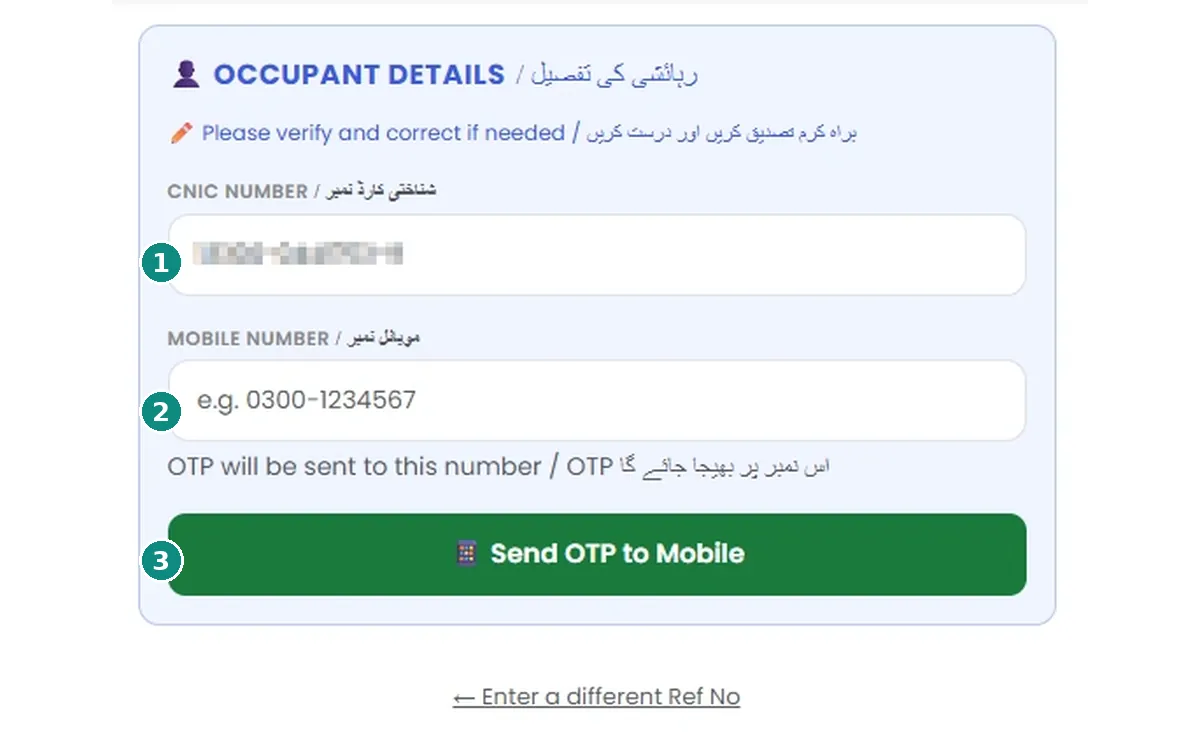
Step 1 — Start From Your Bill’s QR Code, or Enter Your Reference Number
Scan the QR code printed on your bill with your phone camera or Google Lens — it takes you straight to the official eligibility checker at css.pitc.com.pk. If the QR code is missing, damaged, or you’re on a desktop, go directly to css.pitc.com.pk and enter your 13–14 digit consumer reference number (top-right corner of your bill), then click Check Eligibility & Apply. Registration is completely free — never pay anyone to register on your behalf; use only the official portal.
Step 2 — Confirm Your Details
If eligible, the portal shows your connection details — consumer name, address, DISCO. Verify everything matches your connection, then click Confirm. This is where the system cross-checks your eligibility against PITC’s national billing database in real time.
Step 3 — Enter Your OTP
A 6-digit OTP is sent to your registered mobile number, valid for 5 minutes. Enter it and click Verify & Complete Registration. If it doesn’t arrive within a minute, use Resend OTP on the same screen.
Step 4 — Done
Once verified, you’ll see a “Registration Successful” message with a “Status: Verified” badge. From your next billing cycle, the subsidy applies automatically — typical savings run Rs. 500–Rs. 2,000+ depending on your usage and DISCO.
A few things worth knowing: if your mobile number isn’t linked to your electricity account, update it first at ccms.pitc.com.pk before registering. There’s no monthly renewal needed — the subsidy applies automatically every cycle as long as your consumption stays within the eligible limit, and if you exceed it in a given month, the subsidy simply pauses for that cycle and resumes automatically once usage returns within range. Watch out for fake websites or agents charging a fee — the real portal is always free.
The 6-Month Rolling Average
PITC doesn’t just check your latest bill — eligibility is based on your 6-month rolling average consumption. If you used 250 units one month but averaged under 200 over the past six, you may still qualify; conversely, if you cross 200 units repeatedly after registering, the protected tariff is removed. Registration itself is permanent, but the subsidy status is re-evaluated every billing cycle, which is exactly why managing your usage in high-consumption months (like summer) matters even after you’re enrolled.
What Happens After You Register
| Step | What Happens |
|---|---|
| Registration complete | You see “Status: Verified” on the portal |
| PITC + DISCO back-end check | Usually completed within 1–3 days — verifies your CNIC against NADRA and checks for duplicate registrations |
| Next billing cycle | Your bill generates at the protected tariff rate |
| SMS confirmation | None sent by default after the initial OTP — your bill itself is the confirmation |
| If your bill still shows the full rate | Check the portal for pending KYC flags; if clear, raise a complaint with your DISCO, including your registration screenshot |
Common Problems & Fixes
| Problem | Likely Cause | Fix |
|---|---|---|
| OTP not received | SIM not PTA biometric-verified | Visit your operator’s franchise (Jazz, Zong, Ufone, Telenor) for biometric verification |
| OTP not received | SIM on Do-Not-Disturb (DND) list | Call your operator helpline to remove the DND block |
| Reference number rejected | Wrong digit count or format | Reference numbers are usually 10–14 digits — try with and without leading zeros |
| “Not Eligible” despite low usage | 6-month average exceeds 200 units | Recent higher-usage months may have pushed your average up — wait and reapply next cycle |
| “Not Eligible” despite low usage | Commercial tariff code on your meter | Contact your DISCO to verify or correct your tariff category |
| Portal not loading | High traffic at peak hours | Try early morning (5–7 AM) or late night (11 PM–1 AM) |
| Registered but bill unchanged | Back-end KYC pending | Check the portal for flags; if none, raise a DISCO complaint with your registration screenshot |
How the Subsidy Shows Up on Your Bill
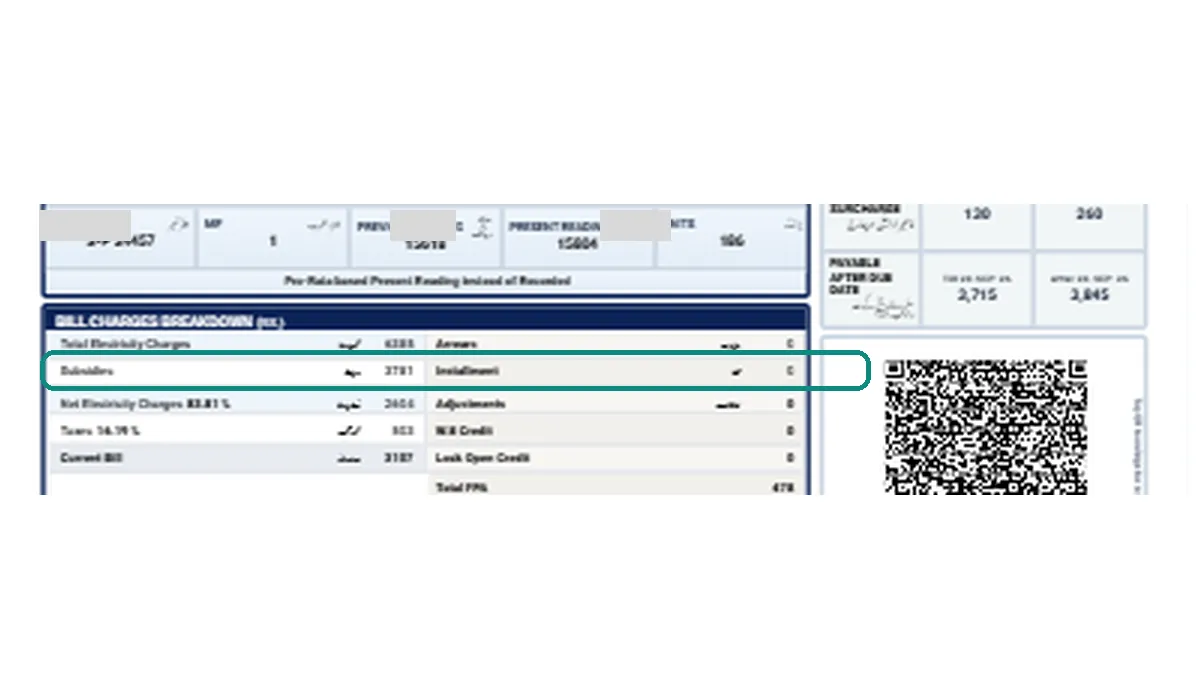
It’s applied at the billing module level, not as a separate cash transfer — you’ll see the discounted payable amount printed directly on your bill. You still pay through the normal channels (bank counters, EasyPaisa, JazzCash, or your DISCO’s app), just for a smaller amount. If your consumption exceeds the threshold in a given month, that cycle bills at the full rate, and the subsidy reinstates automatically once usage returns within range.
Documents You Need
Your latest bill (for the reference number), the account holder’s CNIC, and an active mobile number registered against the account. Nothing needs to be physically submitted — everything is verified digitally through PITC and NADRA.
FAQs
Is there a fee to register?
No — registration is completely free. Never pay a third party to register for you; use only css.pitc.com.pk.
What’s the consumption limit?
Standard threshold is 200 units/month for domestic consumers, though the government can adjust this — check the official portal for the current limit.
I use under 200 units but the check says I’m not eligible — why?
This can come down to your tariff category, whether your CNIC is correctly registered in NADRA, or whether your mobile number is linked to the account. Contact your local DISCO’s customer service for help.
Can I check eligibility for a connection not in my name?
You can check eligibility with any reference number, but completing registration requires the account holder’s own CNIC and mobile number.
Does the subsidy renew automatically?
Yes — once enrolled, it applies every cycle automatically as long as consumption stays within the threshold. No monthly action needed.
What if I have more than one connection?
The subsidy applies to one domestic connection per CNIC — if you hold multiple, only one qualifies.
My reference number won’t work in the checker — what now?
Enter it exactly as printed on your bill, usually 13–14 digits with no spaces or dashes. If it still fails, go directly to css.pitc.com.pk or contact your DISCO’s helpline.
Can a tenant register if the bill is in the landlord’s name?
Yes — CSS allows the occupant, not just the legal account holder, to register with their own CNIC and mobile number. The landlord doesn’t need to be present or involved, and the new registration overrides any prior one on that reference number.
My OTP isn’t arriving — what should I check?
Three common causes: your SIM isn’t PTA biometric-verified, it’s on a Do-Not-Disturb list, or there’s a temporary SMS delay. Verify your SIM at your operator’s franchise first, then call to check for a DND block, then return and click Resend OTP.
This page provides informational guidance about the PITC Consumer Subsidy Scheme. All eligibility checks are processed directly by the official PITC government portal — we don’t collect or store any personal or billing data.
Keep reading
Related guides
How to Pay Your Electricity Bill
Six ways to pay a DISCO electricity bill — mobile wallets, banking apps, QR scan, ATM, retail outlets or card — and what to do if…
How to Apply for a New Electricity Connection
A step-by-step walkthrough of Pakistan's ENC Portal — the shared online system every DISCO uses for new connections.

How to File an Electricity Billing Complaint
Five ways to register a complaint with your DISCO — and what to do if the first attempt doesn't get a response.
Put the guide to work
Free tools for all 11 DISCOs. No sign-up, nothing stored.